Strategy Basics
This page will teach you the basics of creating a strategy that can be used by Naxbot in order to execute trades automatically on a cryptocurrency exchange of your choosing.
When you create a strategy, you will immediately be greeted by Naxbot’s script editor. While this may seem daunting at first, don’t worry! This page will guide you through the process of creating a simple strategy that you can use as a starting point for your own strategies.
Key Concepts
Naxbot strategy scripts are programmed in Lua , a
lightweight scripting language that is ideally suited for use by non-software developers due to its simplified syntax
and ease of use. A strategy always contains a single script. Naxbot expects this script to contain a function named
process, which is called by Naxbot on every candle close.
The process function is expected to return a Table containing at
least the following elements:
- a boolean array named
long_entry_condition - a boolean array named
short_entry_condition - a boolean array named
long_exit_condition - a boolean array named
short_exit_condition - a number array named
tp_xwherexis a nonezero positive integer for every TP target you added to the strategy - a number array named
stop_loss
The arrays returned by the process function must be of the same length as there are number of klines. This is normally achieved without any special care, but in cases where you are manually building arrays when writing advanced logic, you must ensure that this is the case. More on what arrays are and how to construct them in a later section.
The most basic strategy script would therefore look like this:
function process()
    return {
        long_entry_condition = constant(false),
        short_entry_condition = constant(false),
        long_exit_condition = constant(false),
        short_exit_condition = constant(false),
        tp_1 = constant(0),
        stop_loss = constant(0),
    }
end
Naxbot is then going to use the information returned by this function in order to determine when to enter and exit trades.
Essentially, the strategy scripts’ job is to use a variety of indicators and algorithms (as specified by you) to determine whether a trade should be entered or exited at a given point in time, and supply Naxbot with values for the stop loss and TP targets. Naxbot will then take care of managing the trades it creates based on the information provided by the strategy script.
Trade Entries
Naxbot is going to enter a trade if either long_entry_condition or short_entry_condition is true. If
long_entry_condition is true, Naxbot will enter a long trade. If short_entry_condition is true, Naxbot will enter a
short trade. In both cases, the stop loss will be placed at stop_loss, which is expected to be less than the entry
price in the case of a long trade, and greater than the entry price in the case of a short trade.
Naxbot will check all open trades and whether they’ve hit their stop loss every general.trade_update_interval_secs
(specified in the config.toml) seconds. If a trade’s stop loss has been hit, Naxbot will
attempt to market close the trade immediately.
Take Profit Targets
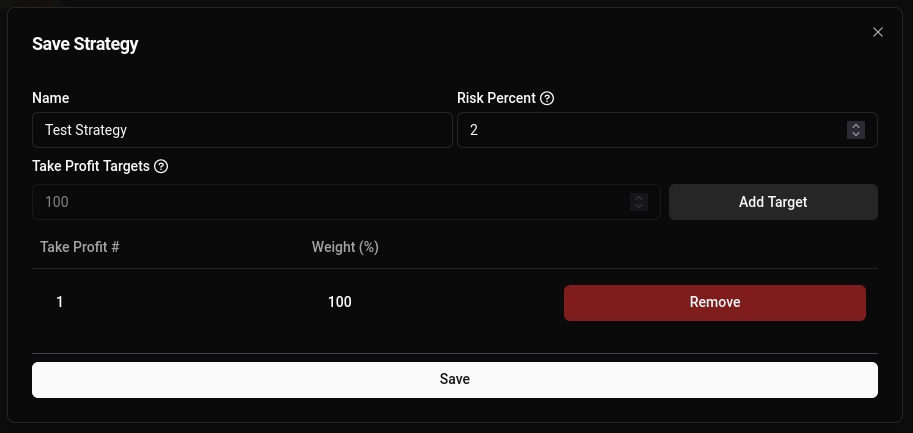
A strategy can have one or more take profit (TP) targets attached to it. These are price targets at which a limit order will be placed at the time of trade entry. Naxbot will periodically check whether the limit orders have been filled in order to update the trade status in the overview. TP targets can be configured when saving a strategy:
Trade Exits
A strategy can output exit signals via long_exit_condition and short_exit_condition. If the signals fire true for
the current kline, any open long or short trades (respectively) belonging to the strategy will be market closed.
Risk Percent
When entering a trade, Naxbot calculates the position size based on the “Risk Percent” value configured for the strategy, and the distance between entry price and stop loss. The position size is then set such that if the trade turns out to lose, you will lose exactly “Risk Percent” of the trading capital allocated to the strategy.
So, for example, if your trading capital is 10,000 USD, and your “Risk Percent” is 1%, then every losing trade will lose 100 USD.
Scripting Basics
Variables
In Lua, variables can either be “global” or “local”. A local variable is declared by preceding it with the word “local”, whereas a global variable is declared without anything else, like so:
-- local variable declaration
local var = 0;

-- global variable declaration
globalvar = 0;
Naxbot provides some global variables out of the box for you to use in your strategies, namely the kline data in form of
open, close, high, low, hl2, and ohlc4. These variables are provided in the form of arrays, which in Lua are
simply tables that are indexed using numbers instead of strings.
Arrays
In Lua, Tables are similar to arrays in other languages. They are a collection of values that can be indexed using a key.
Within the context of Naxbot scripting however, we have access to actual “Arrays”. Note that from now on, whenever we use the word “Table”, we refer to the Lua concept, and whenever we use the word “Array”, we refer to the Naxbot data structure.
Naxbot arrays are indexed using numbers, with the first index starting at 1, similar to Lua tables. Most functionality
within Naxbot’s scripting expects these arrays to be of the same length, namely equal to the number of klines. You can
create a new array using the num_array or
bool_array functions, and append elements to it using array:push(element).
Arithmetic Operations
Although most variables returned by Naxbot-native functions are arrays, Naxbot’s scripting engine allows you to use
basic arithmetic operators (+, -, *, /) on number arrays and logical operators (&, |) on boolean arrays. For
number arrays:
+performs an element-wise addition of two arrays-performs an element-wise subtraction of two arrays/performs an element-wise division of two arrays*performs an element-wise multiplication of two arrays
And for boolean arrays:
&performs an element-wiseANDoperation on two arrays|performs an element-wiseORoperation on two arrays
Additionally, while you can use brackets [] to index an array in Lua and retrieve a single element from an array
(e.g. use close[0] to get the first close in the history of an asset), you can use parentheses () to shift an
array to the right. This is useful if you want to perform arithmetics on past data. Consider the following example:
-- we define price to be { 1, 2, 3, 4, 5, 6, 7 }
local price = num_array()
for i = 1,7 do
    price:push(i)
end

local shifted_price = price(1)
-- shifted_price is { 0, 1, 2, 3, 4, 5, 6 }

local twice_shifted_price = shifted_price(1)
-- twice_shifted_price is { 0, 0, 1, 2, 3, 4, 5 }
You can see that the () operation shifts all array elements one to the right, leaving 0 in place of previous
elements.
In this example, let’s say that the current kline is the last one, in other words price[#price], aka where price
is 7 (the # operator retrieves the length of an array). If we want to get the difference between current price
and yesterday’s price (assuming a kline timeframe of 1D), we can simply do something like this:
local price_diff = price - price(1)Since price(1) basically lets us look 1 kline into the past.
Indicators & Logical Functions
Now, let’s say we want to take things further, and see whether the price difference of today’s price is greater than
the Average True Range of length 21 (arbitrarily chosen number). Let’s start with a script like this:
local our_atr = atr(21)

-- `close` is a variable provided by Naxbot
local price = close

local price_diff = price - price(1)
To make our comparison, we will need to use a helper function that can work with arrays, since simply using the >, <
operators is going to fail. For this, Naxbot provides the following helper functions:
gt(a, b)to return a boolean array that istruewherea > bandfalseotherwiselt(a, b)to return a boolean array that istruewherea < bandfalseotherwisegeq(a, b)to return a boolean array that istruewherea >= bandfalseotherwiseleq(a, b)to return a boolean array that istruewherea <= bandfalseotherwise
This means that we can make our comparison like so:
local is_diff_greater_than_atr = gt(price_diff, our_atr)The variable is_diff_greater_than_atr now contains a boolean array that is true where the price difference is
greater than the ATR, and false otherwise. This array is also suitable to be used as an entry or exit condition
(purely based on its shape however, not the actual values).
Taking it further
Now, let’s say we want to make our entry condition a bit more complex. We want to enter a long position if the price
difference is greater than the ATR and the price has gone up from the previous kline. This can be done by using the
& operator to perform an element-wise AND operation on two boolean arrays. In Naxbot scripting, this would look like
this:
local our_atr = atr(21)

-- `close` is a variable provided by Naxbot
local price = close

local price_diff = price - price(1)

local is_diff_greater_than_atr = gt(price_diff, our_atr)

local is_price_rising = gt(price, price(1))

local is_price_rising_and_diff_greater = is_diff_greater_than_atr & is_price_rising
Variable Initialization
Though Naxbot’s arrays can also operate with single numbers & booleans most of the time, there are instances where you
will need to supply two arrays for a given operation. Naxbot provides a convenient shorthand function to create an array
with the right number of elements filled with a single value via the constant
function. For example, with constant(5), you create an array with length equal to the number of klines that is filled
with the number 5.
Custom Functions
If you find yourself reusing certain logic multiple times, or you wish to implement a custom indicator, you can create a
custom function which you can then call from the process function. Your custom function should be placed outside the
process function. Take a look at this example with the
awesome oscillator indicator:
function awesome_oscillator()
    local ao = sma(hl2, 5) - sma(hl2, 34)
    local diff = ao - ao(1)
    local rising = gt(diff, 0)

    return {
        ao = ao,
        rising = rising
    }
end

function process()
    return {
        long_entry_condition = constant(false),
        short_entry_condition = constant(false),
        long_exit_condition = constant(false),
        short_exit_condition = constant(false),
        tp_1 = constant(0),
        stop_loss = constant(0),
    }
end
Conclusion & Further Reading
Now you have the basic information required to begin writing your own strategy. In the next chapter, you will actually create your first strategy with what you’ve learned so far.